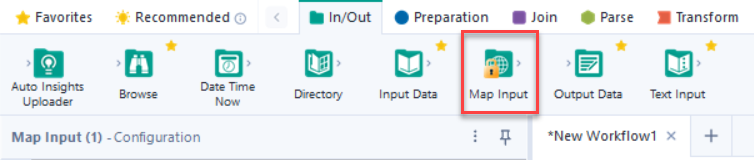
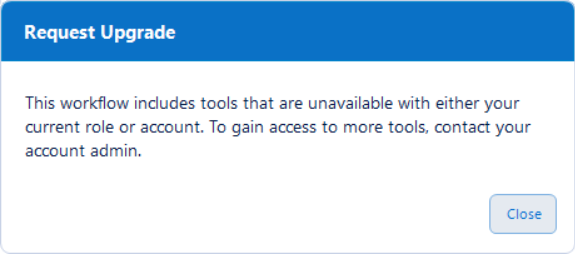
Basic User Capabilities
With the Basic User role, you have access to Designer Desktop or Designer Cloud/Live Query. You can create workflows that use the following capabilities, tools, and features.
Basic Prep and Blend Tools
With the Basic User role, you have access to basic prep and blend tools available via Designer Desktop and Alteryx One.
Both the Professional and Enterprise Editions include Designer Desktop and Alteryx One. Basic users on either edition have access to both tools.
Tool Category | Tool | Designer Desktop | Alteryx One |
|---|---|---|---|
Developer | Block Until Done (Designer Desktop) | ✓ | N/A |
Dynamic Input (Designer Desktop) | ✓ | N/A | |
Dynamic Rename (Designer Desktop) Dynamic Rename (Designer Cloud/Live Query) | ✓ | ✓ | |
Message (Designer Desktop) | ✓ | N/A | |
Control Container (Designer Desktop) | ✓ | N/A | |
Documentation | Comment (Designer Desktop) | ✓ | ✓ |
Tool Container (Designer Desktop) | ✓ | ✓ | |
In/Out | Text Input (Designer Desktop) Text Input (Designer Cloud/Live Query) | ✓ | ✓ |
Browse (Designer Desktop) | ✓ | N/A | |
Input Data (Designer Desktop) Input Data (Designer Cloud/Live Query) | ✓ | ✓ | |
Output Data (Designer Desktop) Output Data (Designer Cloud/Live Query) | ✓ | ✓ | |
Directory (Designer Desktop) | ✓ | N/A | |
Join | Append Fields (Designer Desktop) Append Columns (Designer Cloud/Live Query) | ✓ | ✓ |
Find Replace (Designer Desktop) Find Replace (Designer Cloud/Live Query) | ✓ | ✓ | |
Join (Designer Desktop) Join (Designer Cloud/Live Query) | ✓ | ✓ | |
Union (Designer Desktop) | ✓ | ✓ | |
Join Multiple (Designer Desktop) Join Multiple (Designer Cloud/Live Query) | ✓ | ✓ | |
Parse | RegEx (Designer Desktop) RegEx (Designer Cloud/Live Query) | ✓ | ✓ |
DateTime (Designer Desktop) DateTime (Designer Cloud/Live Query) | ✓ | ✓ | |
Text to Columns (Designer Desktop) Text to Columns (Designer Cloud/Live Query) | ✓ | ✓ | |
Preparation | Generate Rows (Designer Desktop) Generate Rows (Designer Cloud/Live Query) | ✓ | ✓ |
Multi-Field Formula (Designer Desktop) Multi-Column Formula (Designer Cloud/Live Query) | ✓ | ✓ | |
Multi-Row Formula (Designer Desktop) Multi-Row Formula (Designer Cloud/Live Query) | ✓ | ✓ | |
Unique (Designer Desktop) Unique (Designer Cloud/Live Query) | ✓ | ✓ | |
Record ID (Designer Desktop) Row ID (Designer Cloud/Live Query) | ✓ | ✓ | |
Filter (Designer Desktop) Filter (Designer Cloud/Live Query) | ✓ | ✓ | |
Formula (Designer Desktop) Formula (Designer Cloud/Live Query) | ✓ | ✓ | |
Sample (Designer Desktop) Sample (Designer Cloud/Live Query) | ✓ | ✓ | |
Select (Designer Desktop) Select (Designer Cloud/Live Query) | ✓ | ✓ | |
Sort (Designer Desktop) Sort (Designer Cloud/Live Query) | ✓ | ✓ | |
Auto Field (Designer Desktop) Auto Column (Designer Cloud/Live Query) | ✓ | ✓ | |
Data Cleanse Pro (Designer Desktop) | ✓ | N/A | |
Transform | Cross Tab (Designer Desktop) Cross Tab (Designer Cloud/Live Query) | ✓ | ✓ |
Running Total (Designer Desktop) Running Total (Designer Cloud/Live Query) | ✓ | ✓ | |
Summarize (Designer Desktop) Summarize (Designer Cloud/Live Query) | ✓ | ✓ | |
Transpose (Designer Desktop) Transpose (Designer Cloud/Live Query) | ✓ | ✓ | |
SDK | V1 SDK Tools (Designer Desktop) | ✓ | N/A |
V2 SDK Tools (Designer Desktop) | ✓ | N/A |
Basic Connectivity Tools
Basic Users have access to basic connectivity options (via flat files) available via Designer Desktop and Designer Cloud.
Designer Desktop
In Designer Desktop, nearly all connectors* are available to Basic Users, including access to Data Connection Manager (DCM).
*Note that Marketo Append, Input, and Output tools are not available for Basic Users.
Designer Cloud
The Basic User role has access to these file connectors via Designer Cloud:
ADLS
Amazon S3
Box
Google Cloud Storage
Google Drive (Output)
OneDrive
SharePoint Files
SFTP
Additionally, all file types are supported, for example:
CSV
Excel (XLS, XLSX, XLSM)
JSON
Parquet
TXT
XML
Designer Desktop Basic Tool Palette
Basic Users on the new Professional and Enterprise editions using Designer Desktop can customize their tool palette to display only the tools to which they have access. This option is also available to existing Designer users who upgrade to 2025.1.
To customize the tool palette to display only these tools…
In Designer, select the gear icon associated with the tool palette to open the Configure Tool Palette window. The gear icon is located just below the search bar.
Select the Basic User preset and select OK.
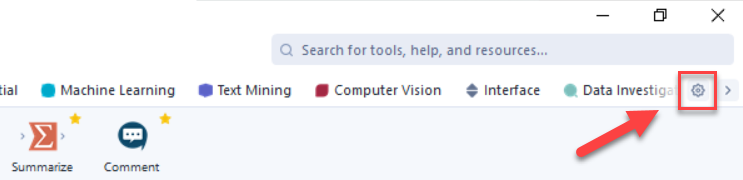
Now, only the tools available to the Basic user role are displayed in the Designer user interface.
New users who install Designer for the first time will have the Basic User preset enabled by default. Users who upgrade to version 25.1 and have chosen a different preset will retain their selected preset; they will not be reverted to the Basic User preset.
Ask Alteryx
A Basic User has access to Ask Alteryx.
Agent Studio
A Basic User has access to Agent Studio.
Collaboration Options
Basic Users have access to folders. They can share workflows and view workflows shared with them.
Data Visualization
Basic Users of the Professional and Enterprise Editions get access to Data Visualization capabilities via Auto Insights.
Feature | Access |
|---|---|
Preset Reports (including Export Options) | Edit |
Custom Reports | Edit |
Orchestrator
Basic Users of the Professional and Enterprise Editions have view access to Orchestrator. They can view plans created by other users.
Automation
Basic Users on the Enterprise Edition have access to schedule workflows and can also run other users' workflows.
Analytic Apps
Basic Users on the Enterprise Edition can run Analytic Apps via App Builder.
FAQ
1. | When a Basic User opens a Designer workflow created by a Full User, what can they do with that workflow? |
Any workflows created by a Full User can only be edited and run by another Full User. As a result...
|